Affiliate Disclosure: Some of the links on this blog are affiliate links. This means I may earn a small commission if you click through and make a purchase, at no extra cost to you. I only recommend products and services I trust and believe will provide value to you.
Introduction
If you’re starting a blog, launching a new website for your business, or searching for fast and reliable WordPress hosting, choosing the right web host is one of the most important decisions you’ll make. Your web hosting provider plays a huge role in your website’s speed, security, uptime, and overall performance—all of which directly impact your visitors’ experience and even your rankings in search engines.
With so many hosting companies out there promising the best features, top-notch support, and unbeatable pricing, it can be overwhelming to know which one to trust—especially if you’re just getting started. That’s where SiteGround comes in. Known for its excellent customer service, impressive speed, and strong security features, SiteGround has become a popular choice among bloggers, business owners, and developers alike.
In this detailed SiteGround review, we’ll explore everything you need to know about the platform in 2025—from its performance and features to its pricing, pros and cons, and how it compares to other top hosting providers. Whether you’re launching your very first site or looking to upgrade your current hosting, this review will help you decide if SiteGround is the right fit for your needs.
Let’s dive in and see what makes SiteGround stand out—and whether it deserves a spot as your hosting partner.

What Is SiteGround?
SiteGround is a well-known web hosting company that was founded in 2004. Over the years, it has built a strong reputation for performance, support, and WordPress optimization.
SiteGround is especially popular with bloggers, small business owners, and developers who need a fast and secure hosting platform. In 2025, SiteGround continues to be one of the top-rated hosting services on review sites like Trustpilot and G2.
Hosting Options Offered
- Web Hosting (Shared Hosting): Great for beginners and small sites.
- WordPress Hosting: Optimized for speed and WordPress-specific features.
- WooCommerce Hosting: Tailored for eCommerce websites.
- Cloud Hosting: For larger or high-traffic websites.
Key Features & Benefits
SiteGround offers a wide range of features that make it a strong contender among hosting providers. Let’s break them down:
Speed & Performance
SiteGround takes speed seriously. It uses Google Cloud infrastructure, which is known for fast performance and high availability.
They also include built-in caching using their custom SG Optimizer plugin, which improves your site’s load time, especially on WordPress.
Data Centers: SiteGround has multiple data centers around the world (USA, Europe, Asia-Pacific), so you can choose the location closest to your visitors for even faster loading times.
Security
SiteGround includes many security features at no extra cost:
- Free SSL Certificates for all domains
- Daily backups to keep your site safe
- AI Anti-Bot system to protect from malicious traffic
- Web Application Firewall (WAF) to block attacks before they reach your site
Uptime & Reliability
SiteGround promises a 99.9% uptime guarantee, and they deliver. In 2024 and early 2025, most monitoring tools reported near-perfect uptime. This means your website is almost always online and available to visitors.
User Experience
SiteGround doesn’t use cPanel like many other hosts. Instead, it has its own Site Tools dashboard, which is beginner-friendly yet still powerful for advanced users.
Features include:
- One-click WordPress installation
- Site staging to test changes before going live
- Easy file manager and database tools
- Free email accounts with your domain
Customer Support
SiteGround’s customer support is among the best in the industry. They offer:
- 24/7 live chat, phone, and email support
- Fast response times (usually under 2 minutes on chat)
- Friendly and knowledgeable agents
- A large knowledge base and tutorials
Many users say SiteGround’s support team goes above and beyond to help—whether it’s fixing an error or guiding you through the setup.
SiteGround Pricing in 2025
SiteGround offers three main shared hosting plans:
1. StartUp Plan
- Good for: One website
- Includes: 10 GB storage, 10,000 monthly visits
- Price: ~$3.99/month (intro) | ~$14.99/month (renewal)
2. GrowBig Plan
- Good for: Multiple websites
- Includes: 20 GB storage, 100,000 monthly visits
- Price: ~$6.69/month (intro) | ~$24.99/month (renewal)
- Bonus: Includes staging, on-demand backups, and enhanced caching features
3. GoGeek Plan
- Good for: Heavier websites or small businesses
- Includes: 40 GB storage, 400,000 monthly visits
- Price: ~$10.69/month (intro) | ~$39.99/month (renewal)
- Bonus: Priority support, white-label site management, Git integration
Note: Prices often change due to promotions. Renewal rates are significantly higher than the intro prices, so it’s smart to buy 2–3 years upfront if you like the service.
Pros and Cons of SiteGround
Let’s break down the main pros and cons to help you decide if SiteGround is right for you.
Pros
- Excellent Speed: Fast load times and optimized for WordPress
- Top Security Features: Built-in and proactive protections
- Fantastic Support: Fast, friendly, and helpful
- Free Features: Backups, SSL, CDN, and email included
- Great Uptime: Reliable hosting you can count on
Cons
- High Renewal Prices: More expensive than competitors after the first term
- Storage Limits: Each plan has capped storage (especially StartUp)
- No Free Domain: Unlike many hosts, SiteGround doesn’t include a free domain name
SiteGround vs. Competitors
SiteGround vs. Bluehost
- Speed: SiteGround is typically faster
- Interface: SiteGround’s Site Tools is cleaner and more modern than Bluehost’s cPanel
- Support: SiteGround has better reviews for customer service
- Pricing: Bluehost offers cheaper plans and includes a free domain
Winner: SiteGround for performance and support; Bluehost for beginners on a tight budget.
SiteGround vs. HostGator
- Performance: SiteGround outperforms in speed and uptime
- Support: SiteGround’s support is faster and more responsive
- Features: HostGator offers more storage, but SiteGround includes stronger security
Winner: SiteGround for most users—unless storage is your top priority.
SiteGround vs. Hostinger
- Speed: SiteGround generally offers better performance, especially under heavy traffic. Hostinger performs well but can show dips during peak times.
- Pricing: Hostinger is cheaper overall, with lower renewal rates and often includes a free domain. Great for budget-conscious users.
- Interface: Both have custom dashboards, but SiteGround’s Site Tools is more intuitive and polished.
- Support: SiteGround edges out with live chat and faster response times. Hostinger’s support is decent but slower during high volume.
Winner: Choose SiteGround if you want premium performance, reliability, and excellent support. Choose Hostinger if you’re on a tight budget and want good value with decent performance.
Who Should Use SiteGround?
SiteGround is ideal for:
- WordPress users who want performance and security
- Bloggers and content creators expecting moderate to high traffic
- Small business websites that require uptime and fast loading
- Agencies and developers who want tools like Git, staging, and client white-labeling
It may not be the best fit if you:
- Need unlimited storage
- Are on a very tight budget
- Want a free domain included
SiteGround Review 2025: Final Verdict
After testing and researching SiteGround in 2025, the verdict is clear: Yes, SiteGround is worth it for most people looking for reliable, fast, and secure hosting.
Its combination of performance, security, support, and user-friendly tools make it stand out in a crowded market. While it’s not the cheapest option, you get what you pay for—and with SiteGround, that means peace of mind.
If you’re serious about your website—whether it’s a blog, eCommerce store, or small business hub—SiteGround offers the infrastructure and support to help you grow. The user-friendly tools and premium performance justify the higher renewal costs for those who prioritize quality.
That said, if your budget is very limited and you’re just testing the waters, Hostinger might be a more affordable starting point. But for users who want long-term reliability and responsive customer support, SiteGround delivers one of the best hosting experiences in 2025.
How to Sign Up for SiteGround in 3 Easy Steps
Getting started with SiteGround is quick and beginner-friendly. In fact, you can launch your website in just a few minutes. Here’s how to do it:
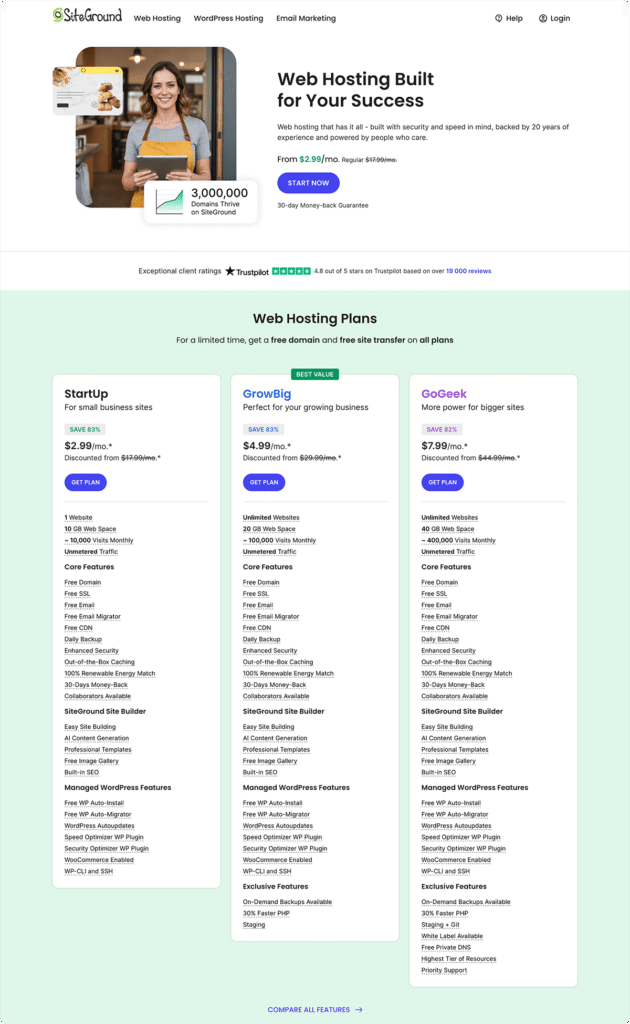
Step 1: Pick the Right Hosting Plan
SiteGround offers three shared hosting plans, each built to meet different needs:
- StartUp – Perfect if you’re launching your first blog or small business site. It’s affordable, easy to use, and great for one website.
- GrowBig – Ideal for growing sites or anyone managing multiple websites. It includes more storage, faster performance with Ultrafast PHP, on-demand backups, staging tools, and supports unlimited sites.
- GoGeek – Designed for high-traffic sites and advanced users. It includes all GrowBig features plus priority support, Git integration, and more resources.
You’ll get a discounted rate when you sign up through my affiliate link—and locking in a longer term means even better value.
Step 2: Choose a Domain Name
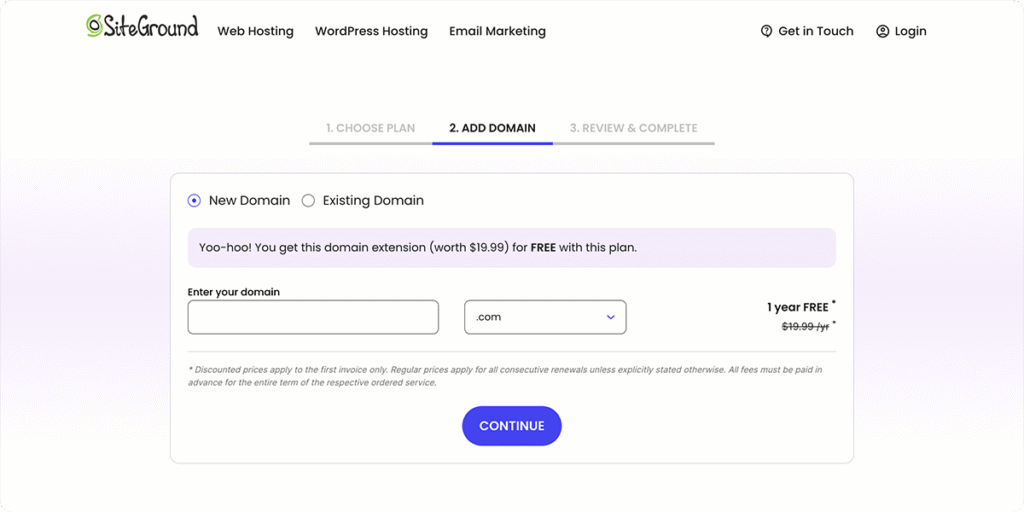
Next, you’ll be prompted to register a domain name or connect an existing one. If you need a new domain, SiteGround makes it easy and often includes a free domain for the first year during promotions.
Step 3: Finalize Your Order
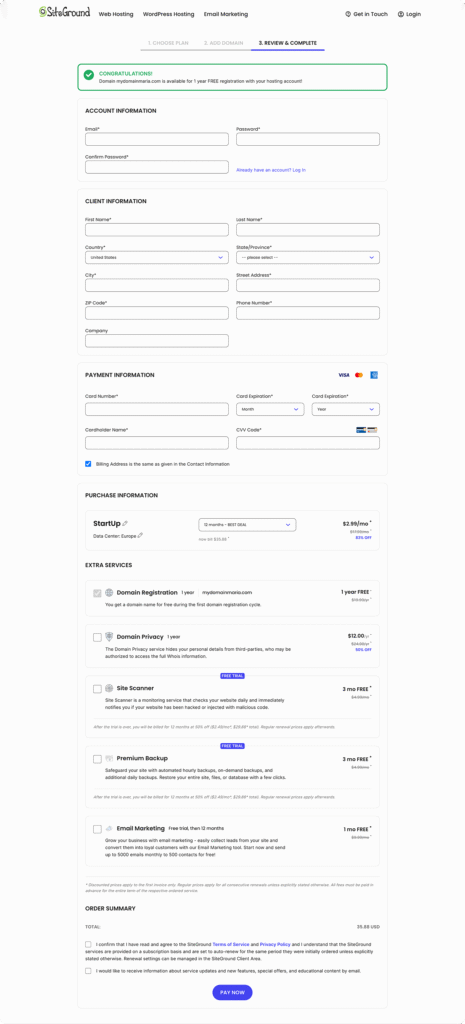
Now it’s time to complete your order. You’ll review your hosting plan and domain, enter your account and payment details, and choose any extra services you want (like domain privacy or SiteScanner). Many of these add-ons are discounted at checkout, so it’s a good time to grab them.
That’s it! Your website is ready to go, and SiteGround will guide you through the rest of the setup.
Ready to Give SiteGround a Try?
You can sign up here and take advantage of their 30-day money-back guarantee.
Let us know in the comments: Have you used SiteGround? What was your experience like?